Command Bar
Navigating LivePlan is made easy with the Command Bar. It offers seamless switching between companies, scenario creation, and easy navigation to various sections of your plan.
Accessing the Command Bar
One way to access the Command Bar is by clicking on the magnifying glass icon at the top-right of your LivePlan window:
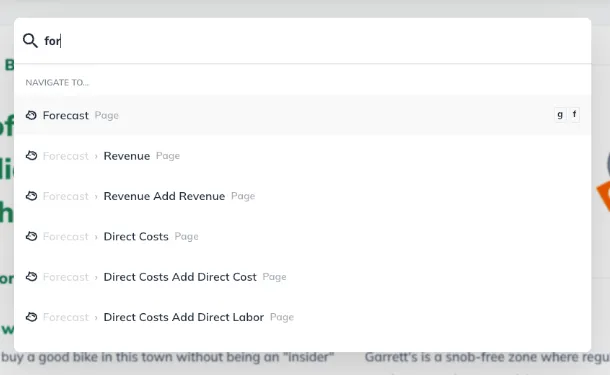
This opens the Command Bar overlay. Type the initial letters of the page or action you want to navigate to in LivePlan. For example, if you want to view one of your Forecast pages, type "for" to filter your search. Then, click on the desired page to proceed.
Keyboard Shortcuts
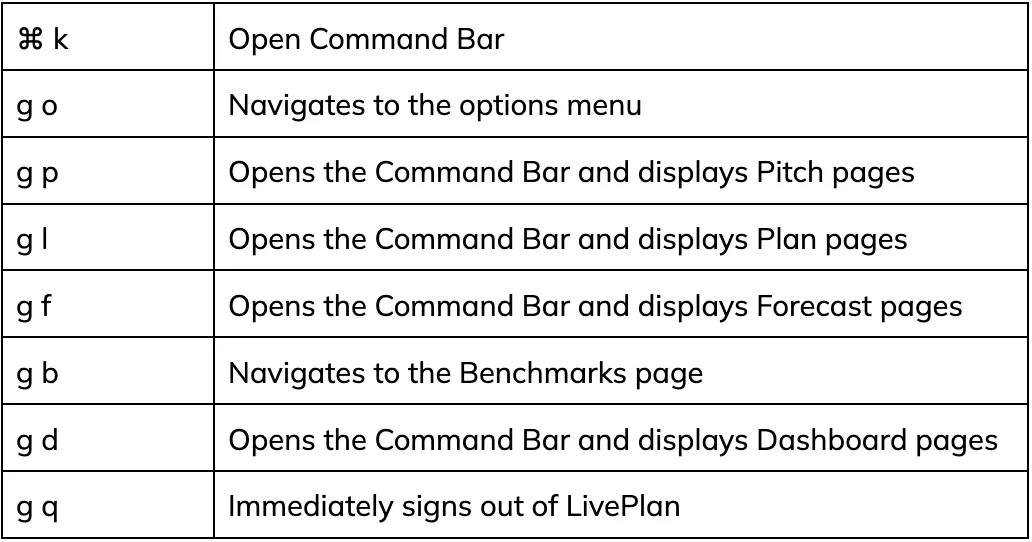
The Command Bar can also be accessed by using keyboard shortcuts. Type any of the following commands to bring up the list of shortcuts and actions for the different sections of LivePlan: