

Removing yourself from an account
If you are a contributor or guest on someone else's LivePlan account and you don't plan to participate in that account anymore, you can remove yourself from it. Alternatively, you can contact us, and we'll be glad to do it for you.
To remove yourself from an account:
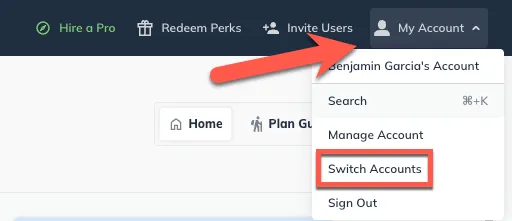
Click the account menu in the lower-left corner of the LivePlan window and select Switch Accounts:
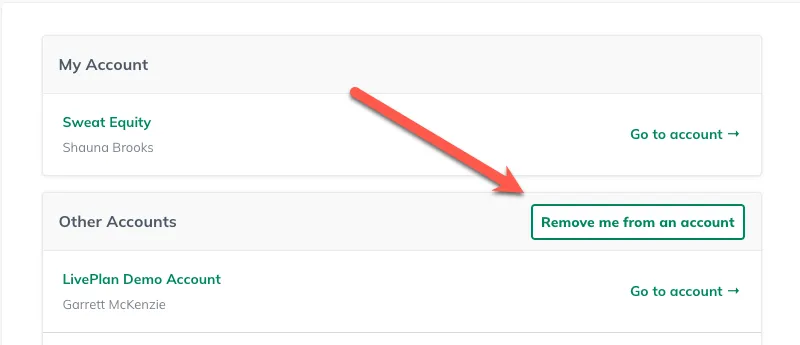
Click Remove me from an account:
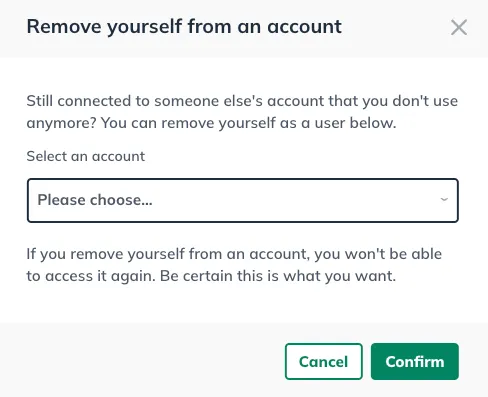
In the overlay that appears, click on the pull-down menu below Select an account. From the list, choose the account that you want to remove yourself from, and then click Confirm:
When you return to the account screen, that account will no longer be listed. The owner of the account will not be notified that you have removed yourself from it.