

Representing assets that vary over time
While most Asset entries in your forecast will involve a one-time purchase amount, there are cases where you might need to show subsequent purchases that increase the asset's value over time.
Suppose you are considering purchasing a piece of machinery for your business. If you buy the base machine for $15,000, that would be your initial asset purchase. However, if you decide to add a major attachment a few months later, spending an additional $3000 to increase the machinery's functionality, the value of that asset would change over time due to the upgrade or capital improvement. In other words, it's the same asset, but its value has increased due to the upgrade (or capital improvement.)
Varying assets that won't be re-sold
If you're creating an Asset entry with varying amounts and it won't be re-sold during your forecast, you can use a single entry. We'll use the example above to illustrate that we're spending twice on the asset: a $15,000 initial purchase and a later $3000 upgrade.
To show the two separate purchase amounts from the example above in the same Asset entry, you would use the Varying Amounts over time input, as shown below:
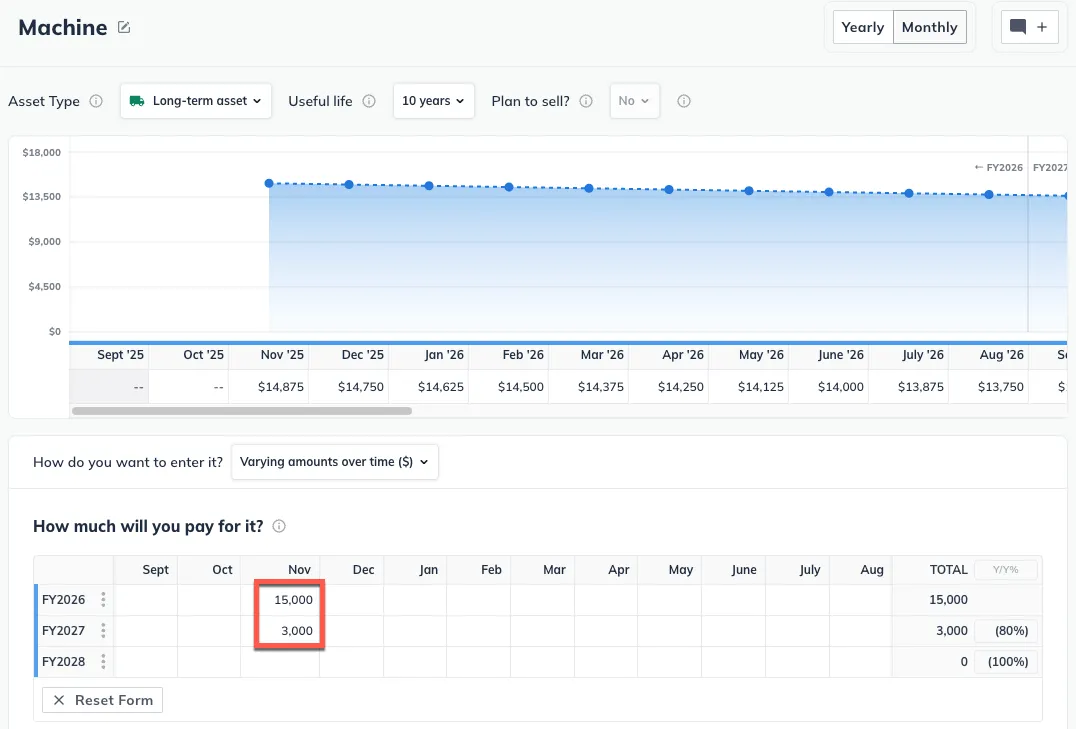
In the next step, you configure the type of asset (Long-term or Current) and its useful life so that depreciation can be calculated correctly as the overall value changes. For more details on entering assets, please see Entering asset purchases.
Varying assets that will be re-sold
The process is slightly different if you want to show your asset being re-sold during your forecast. In this case, we'll use a separate entry for each segment of the asset purchase.
Using the same example from above, this process would result in two entries on the Assets page: one for the initial machinery purchase of $15,000 and one for the upgrade purchase of $3000, as shown below:
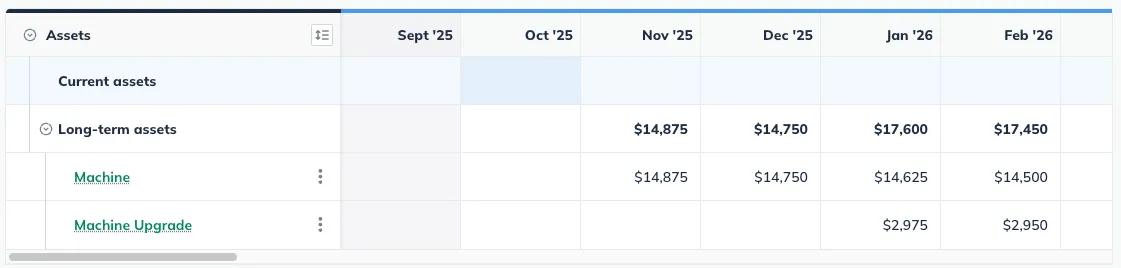
Each entry should be set to the same type (Current or Long Term) and have the same useful life span. Usually, this means setting the same length of useful life for both entries. In some cases, where the asset purchases happen many months apart, you may need to set a different useful life for each.
In addition, you'll need to set both asset entries as being re-sold. Set each one to be sold in the same future month:

For more info:
- Preparing a forecast
- How do I edit, delete, and copy forecast entries?
- Entering an asset purchase with a down payment
- Entering a previously-owned asset for a start-up business
- What is the difference between long-term assets and current assets?
- What is the difference between depreciation and amortization?