Changing the number of active companies
The default LivePlan account contains one active company. An active company can be edited and shared with others. You can create as many companies in your account as you like. Any company that is not currently active is stored in archive until you need it. You can learn more about this in Managing your companies, pitches, and plans.
Using the upgrade options in LivePlan, you can also increase the number of active companies allowed in your account for an added subscription fee.
To change the number of active companies in your account:
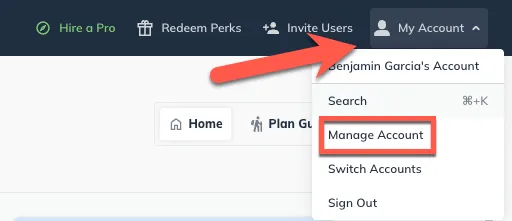
From the Account menu, choose Manage Account:
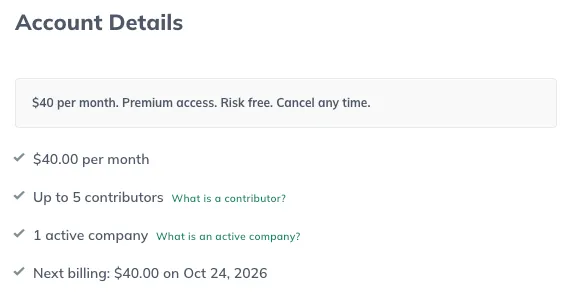
On the Account Details page, you'll see your current account pricing and active company limit:
Once you make a selection, you'll see your new total billing renewal charge and next billing date:

In the Select to change active companies pull-down menu, select the number of active companies you'd like. The additional pricing will be displayed next to the number of active companies:
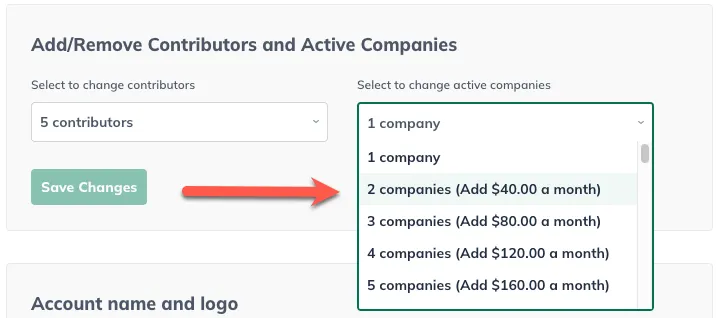
When you are satisfied with your selection, click Save Changes.

To exit the account management page, click the back arrow at the upper-left corner of your LivePlan window: